Elevate Release Notes
November 2026
PLEASE NOTE
This page will be updated throughout the month as new releases are deployed, so check back regularly for the latest updates and improvements.
This month's release may include product updates, new features, enhancements, essential bug fixes, and more.
Feature
Anonymous Survey Response Report
We've added an anonymous survey response report to the survey results page in Elevate (Fig. 1). The report shows survey answers without displaying learner names, allowing administrators to review feedback, such as instructor evaluations, without exposing who submitted it. (November 6, 2026)
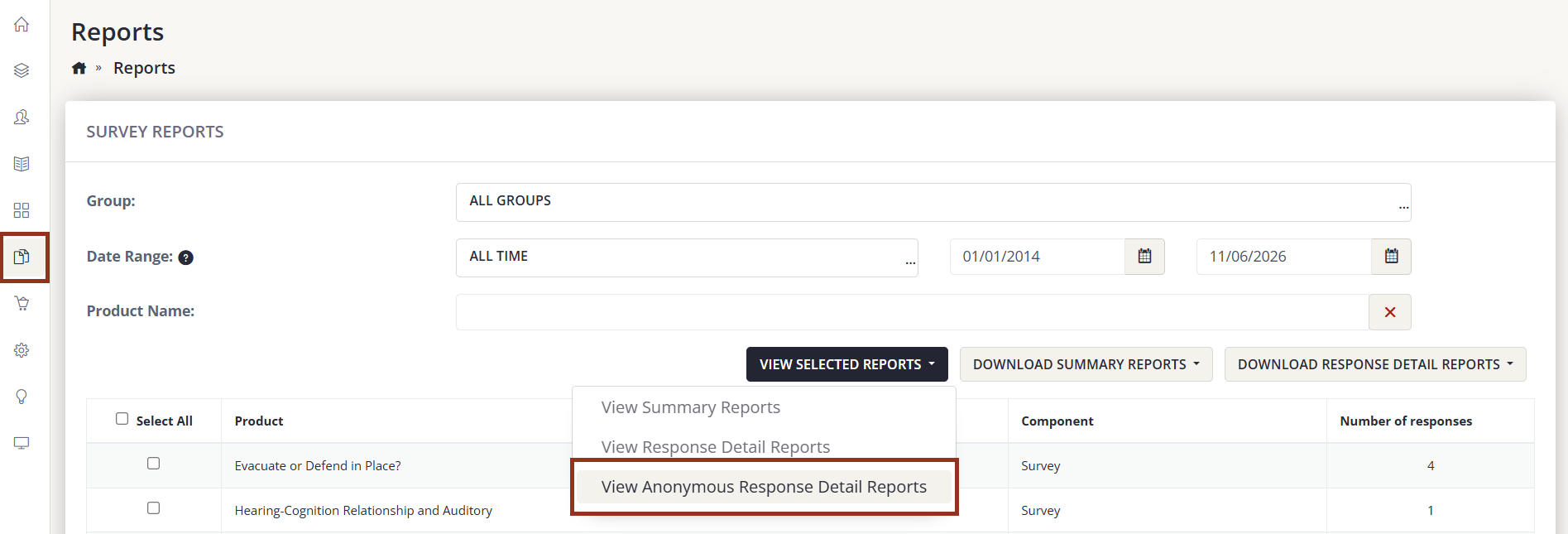
Fig. 1 - Reports > Survey Reports > View Selected Reports Button Options.
Improvement
Custom Logo Link URL in Themes
Administrators can now set a custom URL for the logo link in Elevate Theme settings, allowing the logo to direct users to a page of your choice, such as your organization's main website. The new Logo Link URL field appears below the Logo Image upload, and if it is left blank, the logo continues to link to the Elevate homepage as before. (November 6, 2026)
Improved Activation Workflow for Cadmium Identity Accounts
We've updated the activation workflow in Elevate to improve the experience of activating an account on sites that use Cadmium Identity. When a user receives the Elevate account activation email, they now see a page that shows which email address to use and directs them to Cadmium Identity to log in or create their login. Sites that don't use Cadmium Identity are unchanged. (November 6, 2026)
Fix
Improved Reliability of Quiz Submissions
An issue was resolved where, in rare cases, submitting a quiz could count a learner's answers twice. This doubled the score shown on the results screen and in the administrator submission email, and could mark a learner as passed who had not met the passing score. Quiz scores and pass/fail status are now calculated once and match the quiz report. The Submit, Previous, and Next buttons are also briefly disabled while a submission is processing, to prevent duplicate submissions. (November 6, 2026)
Custom User Field Options Can Now Be Deleted When Unused
Users were unable to delete options from custom user fields, even when no one had selected them. This issue has been resolved. Only options that users have actually selected remain locked, so saved answers stay valid, and any option nobody has chosen can now be removed. Locked options display a tooltip explaining why they can't be deleted. (November 6, 2026)
"Test Now" Email for Group Portals Displays Tags Correctly
An issue was resolved where the "Test Now" button in Elevate Email for Groups did not display the new group programmable tags correctly in the test email. Test emails now show group programmable tags as expected, allowing administrators to preview how a message will appear before sending it to a group. (November 6, 2026)
Zoom Accounts No Longer Blocked from Removal by Non-Zoom Webinars
An issue was resolved where administrators were unable to remove a Zoom account because it was still linked to webinar components that had been switched to a different webinar type. Changing a webinar component away from Zoom now disconnects it from the Zoom account. Zoom accounts can now be removed once no components are using them. (November 6, 2026)
Was this article helpful?
That’s Great!
Thank you for your feedback
Sorry! We couldn't be helpful
Thank you for your feedback
Feedback sent
We appreciate your effort and will try to fix the article