Elevate Release Notes
October 2026
PLEASE NOTE
This page will be updated throughout the month as new releases are deployed, so check back regularly for the latest updates and improvements.
This month's release may include product updates, new features, enhancements, essential bug fixes, and more.
Improvement
Elevate Full Site Search – Improved Keyword Matching and Tag-Style Keyword Entry
We've improved full site search so learners can find content more easily. Keywords are now entered as individual tags: type a word and press Enter, Tab, or comma to add it, then remove it with the delete icon or Backspace (Fig. 1). Searches ignore punctuation and common words such as "and" and "the", and results must contain all of the keywords, in any order. Matching follows your Full Site Search field settings (title, summary/description, and speaker name). (October 22, 2026)
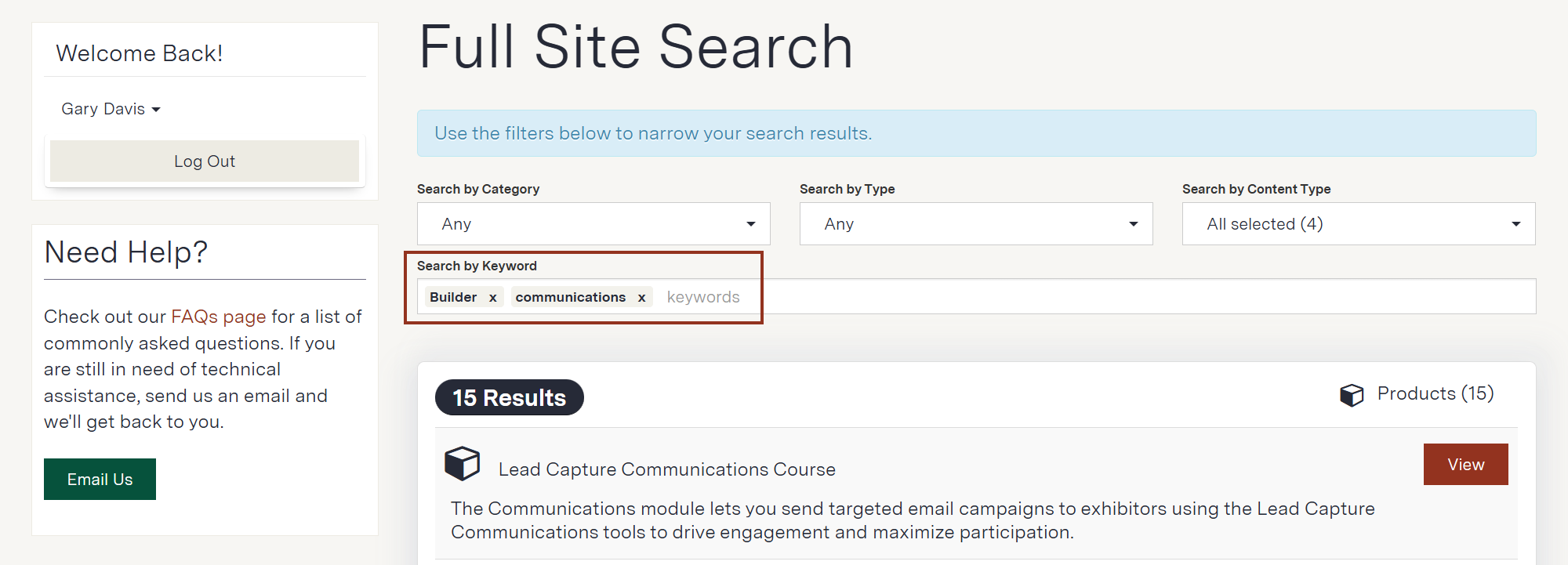
Fig. 1 - Elevate Full Site Search.
Fix
AI Writing Assistant Now Preserves Text Formatting
We've updated the AI Writing Assistant so that formatting is carried through when you revise text in the rich text editor. Bold, italics, headings, and bulleted and numbered lists are now retained in the revised content instead of being returned as plain text. Because the revised wording is generated by AI, the exact formatting of a result can vary from one revision to the next. (October 5, 2026)
Manage Webinar Tasks Layout and Completion Date Fixes
An issue was resolved where the Manage Webinar Tasks pages had not been updated to the current admin design. These pages now match the rest of the admin panel. Related fixes on the same screens allow the Completion Date to save correctly and display afternoon times accurately, and the Import Templates page now opens without error. (October 5, 2026)
Event Tasks – Empty Task Lists Can No Longer Be Saved as Templates
An issue was resolved where a task list with no tasks could be saved as a template, displaying a success message but creating a template with nothing in it. The "Save This Task List As A Template" option is now hidden when a task list is empty, and empty templates no longer appear when choosing a template. Existing empty templates remain editable under Settings > Templates > Task List Templates. (October 5, 2026)
Manage Event Tasks – Task Deadlines Now Display the Time
Task deadlines on the Manage Event Tasks page and in the Create Task List preview showed only the date, so tasks due hours apart on the same day looked identical. This issue has been resolved, and deadlines now display the date, time, and timezone (for example, "07/23/2026 at 2:00 PM (EDT)"). Deadlines on the Web Events page now match the task page, and changes to a task list's Completion Date are now saved as expected. (October 5, 2026)
Was this article helpful?
That’s Great!
Thank you for your feedback
Sorry! We couldn't be helpful
Thank you for your feedback
Feedback sent
We appreciate your effort and will try to fix the article